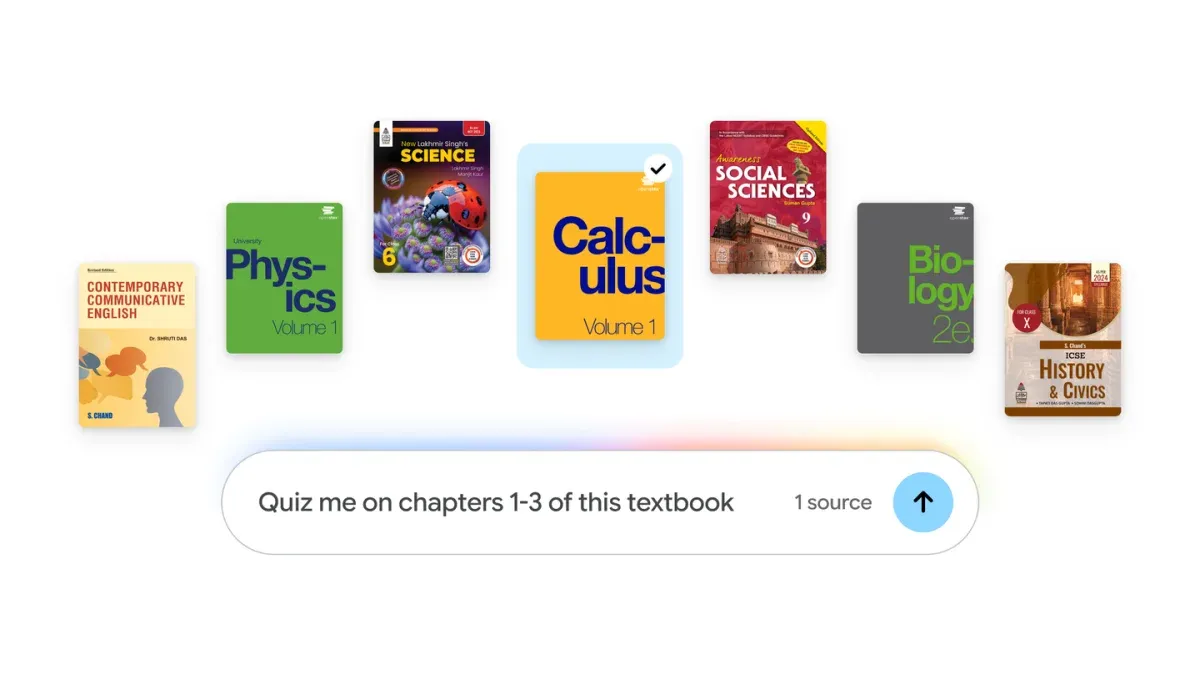
Google is expanding Expert Intelligence, its cross-Google initiative for working with trusted sources through Google AI products, so students can add course materials to Gemini Notebook. Last month Google introduced the initiative, and users could already add eligible ebooks purchased from Google Play Books. Now students can add hundreds of textbooks at no charge.
The catalog includes textbooks from providers in the U.S. and India, including OpenStax, Open Textbook Library, and S Chand Publishing. Once a textbook is added, every answer is grounded directly in that textbook, with inline citations and direct links back to the original source. Students can also turn textbook content into tailored study guides, practice quizzes, flashcards, and more.
Key Features at a Glance
- Hundreds of textbooks: Titles from OpenStax, Open Textbook Library, and S Chand Publishing – useful for building a course library without buying books.
- No charge: Textbooks are added at no cost – students can use them alongside their own sources.
- Grounded answers: Every answer draws directly from the added textbook – responses stay tied to course material.
- Inline citations: Each answer includes citations – students can check claims against the text.
- Direct source links: Links go back to the original textbook – quick verification and deeper reading.
- Study tools: Study guides, practice quizzes, flashcards, and more – textbook content becomes review material.
Availability
Students can access the textbooks in Gemini Notebook at no charge. To add one, open your notebook, select “Add sources,” then select “Textbooks” to browse the catalog.