Google Play lets anyone run vibe-coded apps privately
Google Play is opening a new door: anyone with an idea can now build a personal Android app and run it on their own device, no developer account required. The move starts in select markets, but it could change who gets to ship software.
Google Play lets anyone run vibe-coded apps privately
Google Play is adding a way for anyone to build a personal app and run it on their own device through the Play Store. The update also brings new discovery tools, social features for players, and family controls. Google describes the goal as moving from “there's an app for that” to “there's an app for me.”
Launch your own app without a developer account
Using Google AI Studio, you can vibe-code a custom Android app. Because many of these apps start as personal projects, Google Play now lets you launch them on your own device. These creations stay private, secure, and separate from the public store catalog. You only need your standard Google account, with no developer account required. The feature starts rolling out today in select markets, including the U.S., for users 18 and over.
In the coming months, you'll be able to share personal apps with a close circle of friends and family. If you later want to share an app with the world, Google Play helps you move to a professional developer account. At that point, your app goes through the same Trust & Safety reviews and quality standards as every professional developer's app.
Discovery across every screen
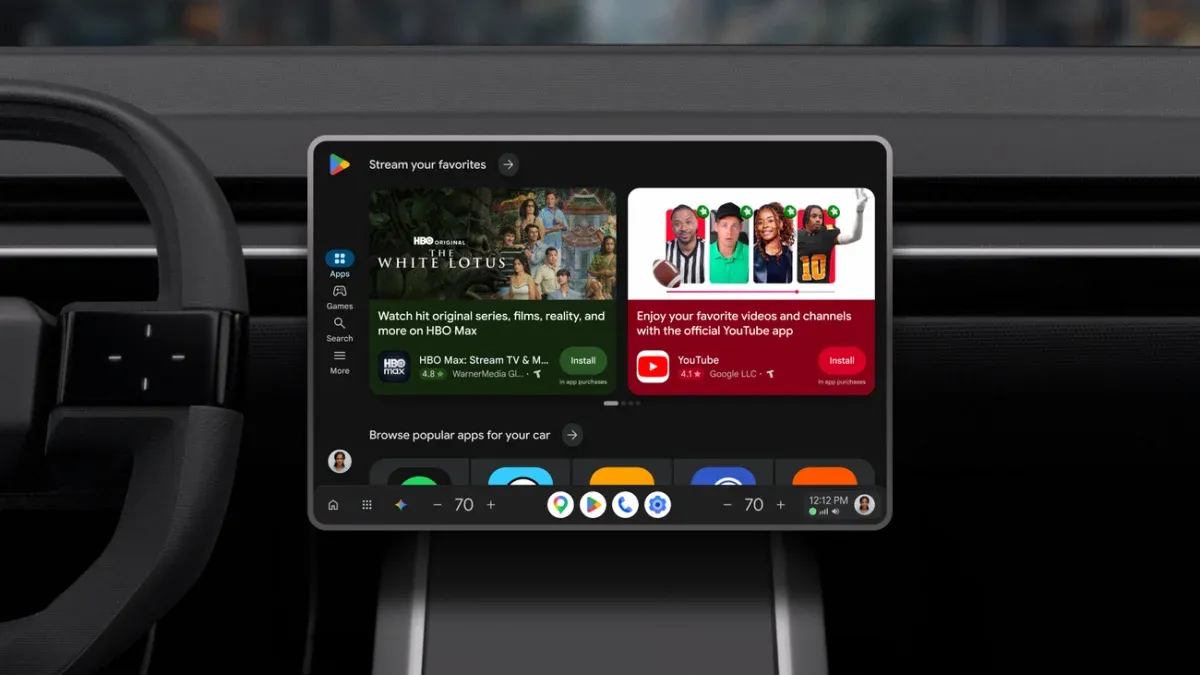
Google says discovery shouldn't stop at the phone. In cars with Google built-in, the updated Play Store adapts to the vehicle's screen. On XR, the Play Store becomes an immersive 3D space where your apps surround you as you browse. On Googlebook, apps optimized for large screens appear front and center.
Sports Topic Pages now cover soccer leagues including Premier League, Champions League, La Liga, Liga MX, and Major League Soccer. They let you follow live scores and jump straight into streaming apps. Google's example is watching MLS on Apple TV with a subscription, available on Google Play.
AI-powered discovery with Ask Play and Play in Gemini
Ask Play lets you ask a question and get tailored recommendations. Starting today, it can also generate a comparison between apps, highlighting key differences and user sentiment. Play in Gemini will bring Google Play's apps, games, and developer content into your Gemini conversations. That rollout to all Gemini users will start soon.
Game Finder and Gamer DNA
Google notes that gamers evaluate games on mechanics, art style, and more, not just popularity. The new Game Finder combines Google Play's gaming knowledge with a community of over 2 billion players to help you find games that match your taste. At its core is Gamer DNA, an analysis of how you play and the preferences you've shared. You can specify games, genres, mechanics, and more to fine-tune your Gamer DNA and see more of what you want.
Game Finder also shows how players with similar Gamer DNA are engaging with a title, how many people you follow are playing it, user review summaries, and which games are trending and why. It rolls out in English to U.S. users today, with more markets coming soon. Google is also introducing Game Playlists for curating collections of games. Soon, you'll be able to share playlists and explore other gamers' lists.
Sprints, Sidekick, and Community Posts
Google argues that staying connected and in the action is what brings players back. Three updates address that:
Sprints are high-energy, 48-hour micro-challenges that match groups of two to five players for fast-paced contests. They roll out to all markets today.
Sidekick, the in-game overlay, now lets you record 30-second Playbacks. It is rolling out to select devices.
Community Posts let players ask and answer questions about a game on its detail page. This is available today across all games and all languages, with automatic translations. Over the coming weeks, Google will add support for developer posts and official announcements.
More games across mobile and PC
Google is bringing PC titles such as Dave the Diver and Warhammer 40,000: Boltgun to Play. More releases over the next few months include REPLACED, Chosen by Odin, and Over the Hill. You can play all of them across Android mobile and PC with cloud save. Game Trials, which lets you try full premium games for a limited time before buying, is expanding from mobile to PC.
Google Play Points and Play Fest
Google Play Points adds value across mobile and PC. Google is kicking off Play Fest, a week-long celebration. During it, you can unlock Play Points multipliers, claim in-game items and developer offers, and enter sweepstakes for real-world prizes.
Family controls and age ranges
Google says Google Play is built on industry-leading security and privacy protections. Parents can now share their child's age range, or their own, directly with apps through the Family Link app. Users can give apps the minimum information needed to deliver a safe, age-appropriate experience.
Key Features at a Glance
Personal app launch: Run apps built with Google AI Studio on your own device, with no developer account needed. Private and separate from the public catalog, for users 18 and over in select markets.
Shared personal apps: Coming months, share with a close circle of friends and family. Later, graduate to a professional developer account if you want to publish.
Ask Play comparisons: Generates side-by-side app comparisons covering key differences and user sentiment.
Game Finder: Draws on a community of over 2 billion players and your Gamer DNA to recommend games, starting in English for U.S. users.
Sprints: 48-hour micro-challenges for groups of two to five players, rolling out to all markets.
Playbacks: 30-second recordings captured through the Sidekick overlay on select devices.
PC expansion: Cloud save for titles playable across Android mobile and PC, plus Game Trials on PC.
Age-range sharing: Parents can share an age range through Family Link so apps can deliver age-appropriate experiences.
Availability
Personal app launch starts rolling out today in select markets, including the U.S., for users 18 and over, with no developer account required. Sharing personal apps with friends and family arrives in the coming months. Game Finder rolls out in English to U.S. users today, with more markets coming soon. Sprints roll out to all markets today, and Community Posts are available today across all games and languages. Play in Gemini will roll out to all Gemini users soon. Play Fest is running as a week-long celebration. Google did not state a price for these features.
Feature
Availability
Personal app launch
Rolling out today in select markets, including the U.S., for users 18 and over, with no developer account required
Sharing personal apps
In the coming months
Game Finder
Rolls out in English to U.S. users today, with more markets coming soon