Onimusha: Way of the Sword GPU Benchmarks — RTX 50 Series at 1080p, 1440p, and 4K
Capcom's Onimusha: Way of the Sword launched on September 4, the first mainline entry in the series after a long silence, and it reached Steam's top new releases chart in its launch week. It also sets a hard floor on the PC side: Windows 11 as the minimum OS, an SSD install, and a 16GB memory baseline — machines still on Windows 10 will not run it at all.
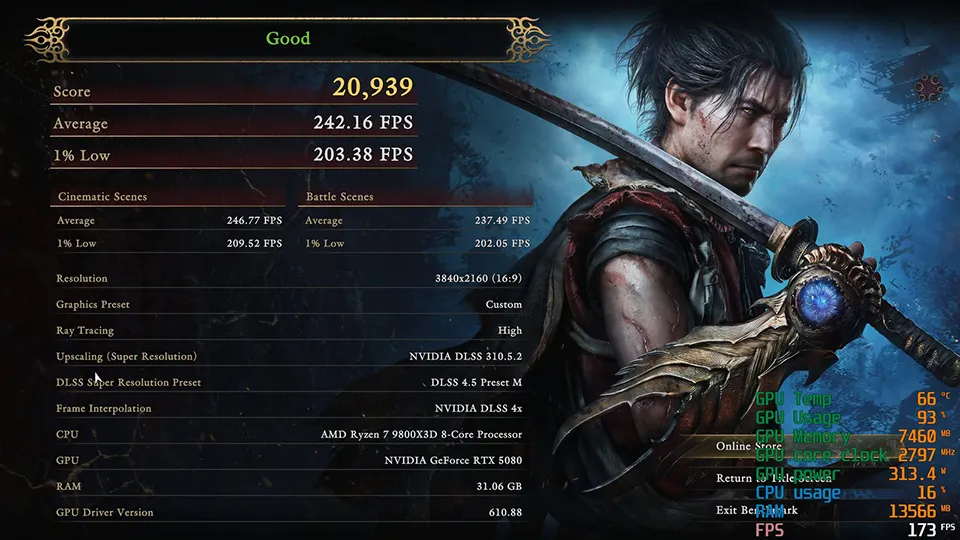
We benchmarked five GeForce RTX 50 graphics cards in-house — the RTX 5080, RTX 5070 Ti, RTX 5070, RTX 5060 Ti and RTX 5060 — at 1080p, 1440p and 4K, with DLSS 4.5 off and on, across two settings profiles and 60 logged configurations.
All five graphics cards ran on the same MSI platform:
| Component | Specification |
|---|---|
| Motherboard | MSI MPG X870E CARBON WIFI |
| CPU | AMD Ryzen 7 9800X3D |
| CPU Cooler | MSI MEG CORELIQUID S360 |
| Memory | TOUGHRAM XG RGB D5 DDR5 6600MT/s 32GB (16GB × 2) |
| Storage | MSI SPATIUM M570 PRO PCIe 5.0 NVMe M.2 FROZR |
| Power Supply | MSI MEG Ai1300P PCIE5 |
| Graphics cards | MSI GeForce RTX 5080 16G, RTX 5070 Ti 16G, RTX 5070 12G, RTX 5060 Ti 16G, RTX 5060 8G |
| GPU driver | NVIDIA 610.88 |
We ran two settings profiles — one for image quality, one for frame rate — and measured each at every resolution with upscaling off and on. We used the game's Ultra and Medium graphics presets, DLSS Quality mode, and 4x frame interpolation.
Important notes on DLSS: Enabling DLSS does two separate things. Super Resolution renders the game at a lower internal resolution and upscales to your monitor's native resolution — a genuine rendering gain. Frame interpolation then creates three additional frames at 4x for every rendered one that never pass through the rendering pipeline at all. With DLSS off, you are reading the card's raw rendering ability. With it on, you are reading the refresh rate your eyes receive, three quarters of which is generated. Both numbers are useful, but they measure different things: one is rendering throughput, the other is display refresh rate.
Ray tracing was fixed at High for every run to maintain a consistent baseline. Unlike games that force it on, ray tracing in Onimusha is adjustable — Off, Low, Medium and High — and turning it down recovers performance. We did not measure that. The game also supports AMD FSR 3.1; we tested DLSS only. 1% lows were logged from in-game benchmark result screens. Input latency was not measured, so this article draws no conclusions about how frame interpolation feels to play.
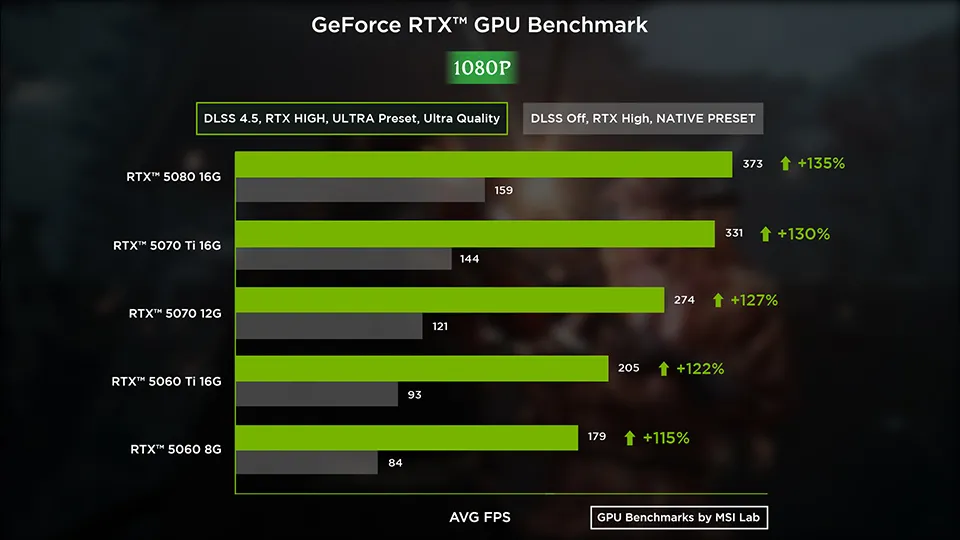
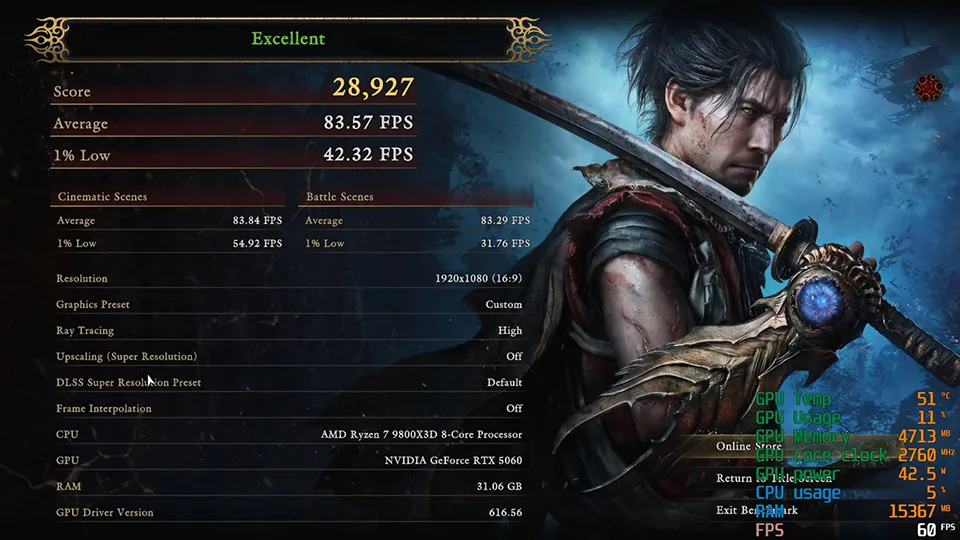
| Graphics card | DLSS Off (Avg. FPS) | DLSS On (Avg. FPS) | DLSS Off VRAM (GB) | DLSS On VRAM (GB) |
|---|---|---|---|---|
| RTX 5080 16G | 158.7 | 373.0 | 8.4 | 9.1 |
| RTX 5070 Ti 16G | 143.9 | 331.2 | 8.5 | 9.1 |
| RTX 5070 12G | 120.8 | 274.2 | 8.4 | 9.0 |
| RTX 5060 Ti 16G | 92.5 | 205.4 | 8.3 | 9.0 |
| RTX 5060 8G | 83.6 | 179.4 | 7.7 | 7.8 |
At 1080p every RTX 50 card runs fast before upscaling — 83.6 FPS on the RTX 5060, 158.7 FPS on the RTX 5080, with ray tracing at High. Switch on DLSS Quality mode with 4x frame interpolation and all five land between 179.4 and 373.0 FPS, enough to fill a 144 Hz or 165 Hz panel from any card. VRAM is a non-issue at this resolution, peaking at 9.1 GB on the Ultra preset.
| Graphics card | DLSS Off (Avg. FPS) | DLSS On (Avg. FPS) | DLSS Off VRAM (GB) | DLSS On VRAM (GB) |
|---|---|---|---|---|
| RTX 5080 16G | 189.7 | 408.4 | 7.5 | 8.2 |
| RTX 5070 Ti 16G | 174.2 | 365.3 | 7.5 | 8.2 |
| RTX 5070 12G | 149.5 | 303.4 | 7.4 | 8.1 |
| RTX 5060 Ti 16G | 116.6 | 227.7 | 7.4 | 8.1 |
| RTX 5060 8G | 106.0 | 204.5 | 7.1 | 7.5 |
Dropping to Medium adds 19.5% to 26.9% — the RTX 5080 reaches 189.7 FPS and the RTX 5060 manages 106.0 FPS. With DLSS on, the range is 204.5 to 408.4 FPS. VRAM allocation falls to 7.1–8.2 GB. At 1080p, the performance gap between entry-level and flagship narrows to 1.9× natively on Ultra and 1.8× on Medium. You do not need flagship money to run this game smoothly at 1080p.
| Graphics card | DLSS Off (Avg. FPS) | DLSS On (Avg. FPS) | DLSS Off VRAM (GB) | DLSS On VRAM (GB) |
|---|---|---|---|---|
| RTX 5080 16G | 123.6 | 325.8 | 8.7 | 9.1 |
| RTX 5070 Ti 16G | 109.4 | 286.7 | 8.8 | 9.1 |
| RTX 5070 12G | 88.6 | 234.3 | 8.2 | 8.9 |
| RTX 5060 Ti 16G | 66.1 | 173.7 | 8.8 | 9.1 |
| RTX 5060 8G | 58.9 | 151.4 | 7.7 | 7.8 |
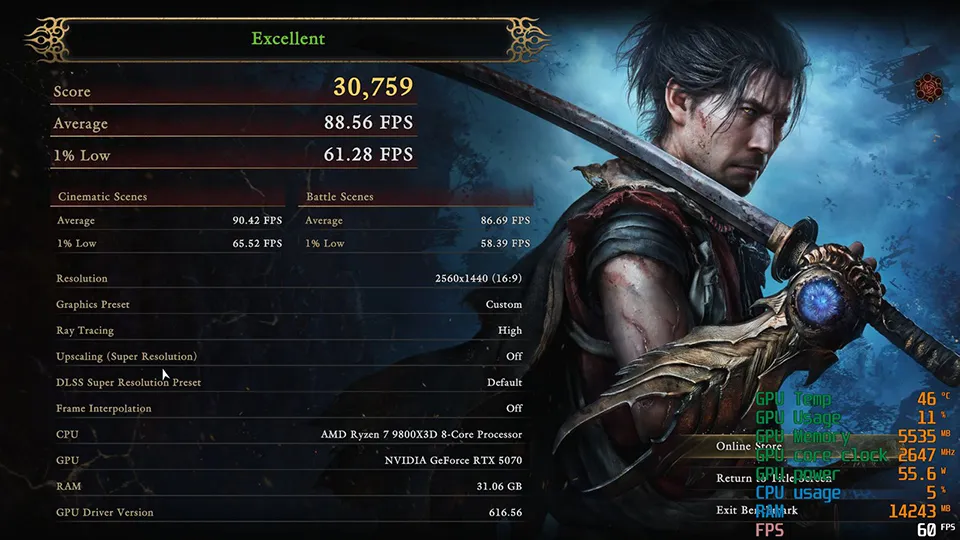
On RTX 50 hardware, 1440p is the sweet spot for Onimusha: Way of the Sword. Natively on the Ultra preset with ray tracing High, the RTX 5080 averages 123.6 FPS, the RTX 5070 Ti 109.4 FPS, the RTX 5070 88.6 FPS and the RTX 5060 Ti 66.1 FPS, with even the RTX 5060 at 58.9 FPS — just 1.1 FPS short of 60, which plays fine in practice. Add DLSS Quality mode and 4x frame interpolation and all five clear 150 FPS, the RTX 5060 included at 151.4 FPS.
| Graphics card | DLSS Off (Avg. FPS) | DLSS On (Avg. FPS) | DLSS Off VRAM (GB) | DLSS On VRAM (GB) |
|---|---|---|---|---|
| RTX 5080 16G | 148.8 | 357.0 | 7.8 | 8.2 |
| RTX 5070 Ti 16G | 132.7 | 315.2 | 7.8 | 8.2 |
| RTX 5070 12G | 108.9 | 258.4 | 7.6 | 8.0 |
| RTX 5060 Ti 16G | 82.5 | 192.1 | 7.7 | 8.0 |
| RTX 5060 8G | 73.6 | 171.5 | 7.0 | 7.5 |
Medium adds another 20.3% to 24.9%, pulling all five cards comfortably above 60 FPS natively. With DLSS on, the range is 171.5 to 357.0 FPS. VRAM stays relaxed — 9.1 GB at most on Ultra, 8.2 GB on Medium, with the 8GB RTX 5060 allocating only 7.0–7.8 GB. If you are running a 1440p 144 Hz or 165 Hz monitor, any RTX 50 card will fill it.
| Graphics card | DLSS Off (Avg. FPS) | DLSS On (Avg. FPS) | DLSS Off VRAM (GB) | DLSS On VRAM (GB) |
|---|---|---|---|---|
| RTX 5080 16G | 74.2 | 242.2 | 9.2 | 10.1 |
| RTX 5070 Ti 16G | 64.6 | 209.8 | 9.1 | 10.1 |
| RTX 5070 12G | 50.0 | 166.0 | 8.9 | 9.9 |
| RTX 5060 Ti 16G | 36.6 | 120.6 | 9.0 | 9.9 |
| RTX 5060 8G | 28.7 | 92.9 | 8.9 | 9.4 |
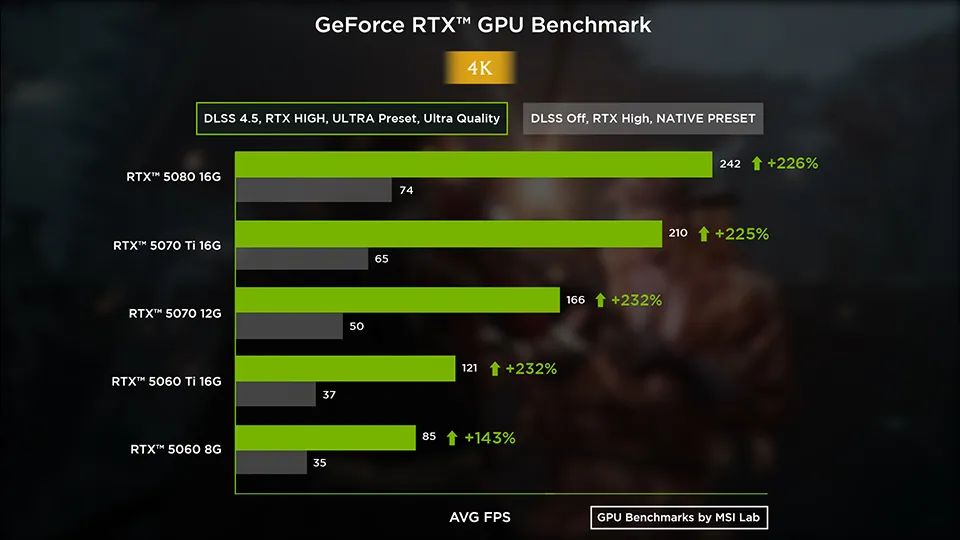
At 4K on Ultra with ray tracing High, only the RTX 5080 and RTX 5070 Ti clearly exceed 60 FPS natively — 74.2 and 64.6 FPS respectively. The RTX 5070 reaches 50.0 FPS, the RTX 5060 Ti 36.6 FPS, and the RTX 5060 28.7 FPS. VRAM allocation becomes tight: the game demands 9.9–10.1 GB on the Ultra preset, while the 8GB RTX 5060 caps at 8.9 GB, leaving it starved. For comfortable native 4K play, 16GB is the safer buy.
With DLSS on, performance stretches to 92.9–242.2 FPS across the board. The real entry point for native 4K gaming sits at the RTX 5070 Ti 16G with its 64.6 FPS average. VRAM at 4K with DLSS peaks at 10.1 GB.
| Graphics card | DLSS Off (Avg. FPS) | DLSS On (Avg. FPS) | DLSS Off VRAM (GB) | DLSS On VRAM (GB) |
|---|---|---|---|---|
| RTX 5080 16G | 92.7 | 282.8 | 8.5 | 9.1 |
| RTX 5070 Ti 16G | 82.7 | 249.4 | 8.4 | 9.1 |
| RTX 5070 12G | 64.8 | 195.4 | 8.2 | 8.9 |
| RTX 5060 Ti 16G | 48.0 | 141.0 | 8.3 | 8.9 |
| RTX 5060 8G | 38.1 | 110.0 | 8.1 | 8.7 |
Medium at 4K buys substantial gains: 24.9% on the RTX 5080 alone, up to 92.7 FPS, and 32.8% on the entry-level RTX 5060, reaching 38.1 FPS. All five cards exceed 60 FPS with DLSS on, ranging from 110.0 to 282.8 FPS. VRAM allocation relaxes to 8.1–9.1 GB; even the 8GB RTX 5060 stays within spec at 8.1 GB.
Best card overall: RTX 5070 12G — 88.6 FPS natively at 1440p on the Ultra preset, 234.3 FPS with DLSS.
Best card for 4K: RTX 5080 16G — 74.2 FPS native on Ultra and 242.2 FPS with DLSS. The real entry point for native 4K is the RTX 5070 Ti 16G at 64.6 FPS.
1440p is the sweet spot. All five cards reach at least 58.9 FPS natively on Ultra with ray tracing High, up to 123.6 FPS on the RTX 5080.
VRAM matters at 4K. 8GB is enough at 1080p and 1440p. At 4K on Ultra the game allocates 9.9–10.1 GB, while the 8GB card tops out at 7.8 GB — so 16GB is the safer buy.
DLSS On figures include 4x frame interpolation. Gains run from +93% to +232%, but three of every four frames on screen are generated — this is smoothness, not rendering performance. The in-game benchmark's own Score actually falls when you enable it.
DLSS does not save power here. Power draw goes up slightly in almost every pairing; the RTX 5080 pulls an extra 36.4 W at 1080p Medium.