Reach a distant room with a USB Wi-Fi adapter
Reach a distant room with a USB Wi-Fi adapter
A long-range USB Wi-Fi adapter with external antennas can hold a steadier link to a router in a basement, attic, or detached garage. Its reach depends on antenna gain, your router's Wi-Fi generation, and how well you aim the antenna. This guide covers the specs to check and three TP-Link models matched to different setups.
These are maximum rates. Your actual speed depends on your router, network, and surroundings.
| Spec | Archer TBE400U Plus | Archer TXE70UH | Archer TX20U Plus |
|---|---|---|---|
| Wi-Fi generation | Wi-Fi 7, BE6500 | Wi-Fi 6E, AXE5400 | Wi-Fi 6, AX1800 |
| 6 GHz | Up to 2,882 Mbps | Up to 2,402 Mbps | — |
| 5 GHz | Up to 2,882 Mbps | Up to 2,402 Mbps | Up to 1,201 Mbps |
| 2.4 GHz | 688 Mbps | 574 Mbps | 574 Mbps |
| Antennas | One adjustable, multi-directional high-gain antenna | Two adjustable high-gain antennas | Two high-gain antennas that rotate 180° |
| Connection | USB 3.0 | USB 3.0 cradle, 1.2-meter cable | 1-meter USB 3.0 cable |
| Best for | A desktop paired with a Wi-Fi 7 router | A Wi-Fi 6E router with the computer in a cluttered or low spot | A dual-band Wi-Fi 6 router |
The “long range” label comes mainly from the antenna: its gain and type. Gain is measured in dBi, which compares an antenna to a theoretical isotropic antenna that sends signal equally in every direction.
A higher gain number doesn't mean the antenna creates more signal. It focuses the same signal into a tighter pattern, so it reaches farther in some directions and less in others, like turning a flashlight from a wide glow into a narrow beam.
Antennas also come in two types:
Compact adapters tuck a small antenna inside the housing. An adapter with external antenna hardware lets you position and aim the antenna toward the router, which matters when the router is “two rooms and a staircase away.”
The key specs are antenna gain and type, Wi-Fi generation, USB version, and operating system support. Antenna gain and type affect how well the adapter holds a weak signal. The other three determine speed and whether the adapter works with your router and computer.
Antenna gain and type. Not every product page lists a dBi figure, so also check the antenna count and whether you can adjust the angle. Adjustable antennas help when the path to the router runs through a floor or wall at a slant.
Wi-Fi generation. Match the adapter to your router. A Wi-Fi 7 adapter still connects to a Wi-Fi 6 router, but it runs at the speeds the older router supports. The 6 GHz band only works when both the adapter and router support Wi-Fi 6E or Wi-Fi 7, and it needs Windows 11. Some Wi-Fi 7 routers are dual-band with no 6 GHz, so check your router's bands first.
USB version. An older USB 2.0 port can hold back a fast Wi-Fi 6 or Wi-Fi 7 adapter, so plug into a USB 3.0 port when you can.
Operating system support. The adapter needs a driver for your OS. Many adapters list Windows 10 and 11, while Mac and Linux support varies by model. After a major OS update, you may need to update the driver. None of the three picks below lists macOS support. The Archer TXE70UH has a Linux driver on its US support page.
No single spec guarantees range in every home. Distance, building materials, and interference from neighboring networks or appliances all affect results.
Place the adapter up high, clear of obstacles, and aimed at the router.
Archer TBE400U Plus: Wi-Fi 7 with Multi-Link Operation. This BE6500 tri-band Wi-Fi 7 adapter has an adjustable, multi-directional high-gain antenna and a USB 3.0 connection. It supports up to 2,882 Mbps on 6 GHz and 5 GHz, enough room for large game downloads and streaming at the same time if your router and Internet plan can keep up. Multi-Link Operation (MLO), a Wi-Fi 7 feature, connects across more than one band to cut lag in games and video calls. Beamforming points the signal toward your router instead of spreading it evenly. Pair it with a Wi-Fi 7 router to get Wi-Fi 7 features.
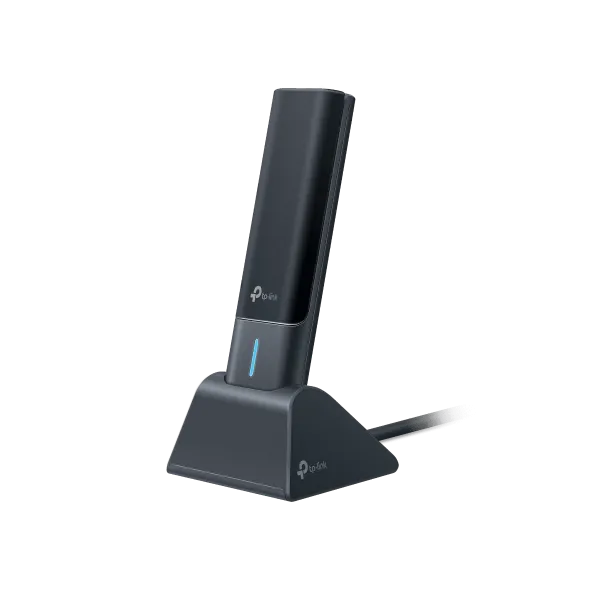
Archer TXE70UH: A USB 3.0 cradle for desktop placement. This AXE5400 tri-band Wi-Fi 6E adapter has two adjustable high-gain antennas and supports up to 2,402 Mbps on 6 GHz and 5 GHz over USB 3.0. Its standout for range is placement. The USB 3.0 cradle and 1.2-meter (about 4-foot) cable let you set it on a shelf or desk, angle the antennas toward the router, and let beamforming concentrate the signal in that direction. The 6 GHz band stays less crowded when neighbors' networks fill 2.4 GHz and 5 GHz. It requires a Wi-Fi 6E or 6 GHz-capable router and Windows 11.
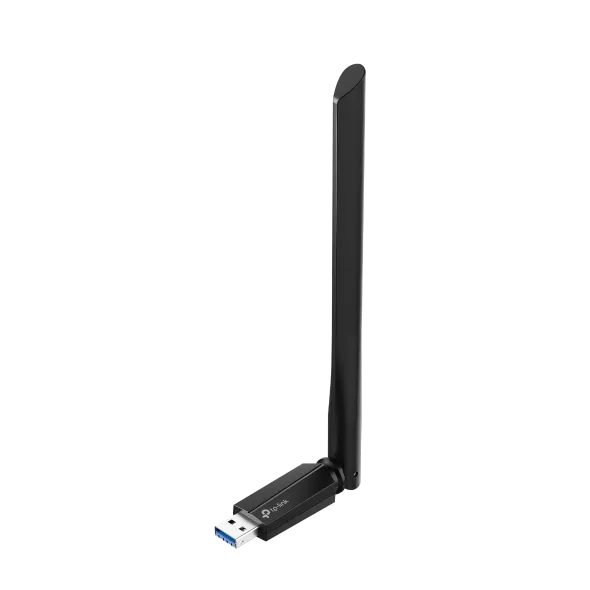
Archer TX20U Plus: Two dual-band antennas for a Wi-Fi 6 router. This AX1800 dual-band Wi-Fi 6 adapter has two high-gain antennas that rotate 180°. It supports up to 1,201 Mbps on 5 GHz and 574 Mbps on 2.4 GHz over USB 3.0 and includes a 1-meter (about 3.3-foot) USB 3.0 cable. Rotate the antennas toward the router and use the cable to move the adapter away from the back of the computer. A pre-loaded driver installs automatically, so you can get online without hunting for a download. It suits a dual-band Wi-Fi 6 router, connecting on 5 GHz or 2.4 GHz, with no new router needed.
The right long-range adapter depends on your router and where your computer sits. Pick the antenna design and Wi-Fi generation that match your setup, confirm you have a USB 3.0 port and OS driver support, and then aim and test the adapter in a few spots.
| Model | Price | Where to buy | As-of date |
|---|---|---|---|
| TP-Link Archer T2U Nano AC600 | $14.99 | Lenovo | Oct. 2026 |
| TP-Link Archer T3U Plus AC1300 | $22.99 | Lenovo | Oct. 2026 |
| StarTech USB Wi-Fi Adapter AC600 | $34.99 | Dell | Oct. 2026 |
| TP-Link AX1800 High Gain Wi-Fi 6 USB Adapter | $49.99 | Lenovo | Oct. 2026 |
| TP-Link Archer TBE3600U Wi-Fi 7 USB 3.0 Adapter | $59.99 | Best Buy | Oct. 2026 |
| Alfa AWUS036ACM Long-Range AC1200 | $69.99 | Amazon | Nov. 2026 |