A woman stands beside a secure terminal with a shield icon and Android logo, overseeing data transfer between user profiles.
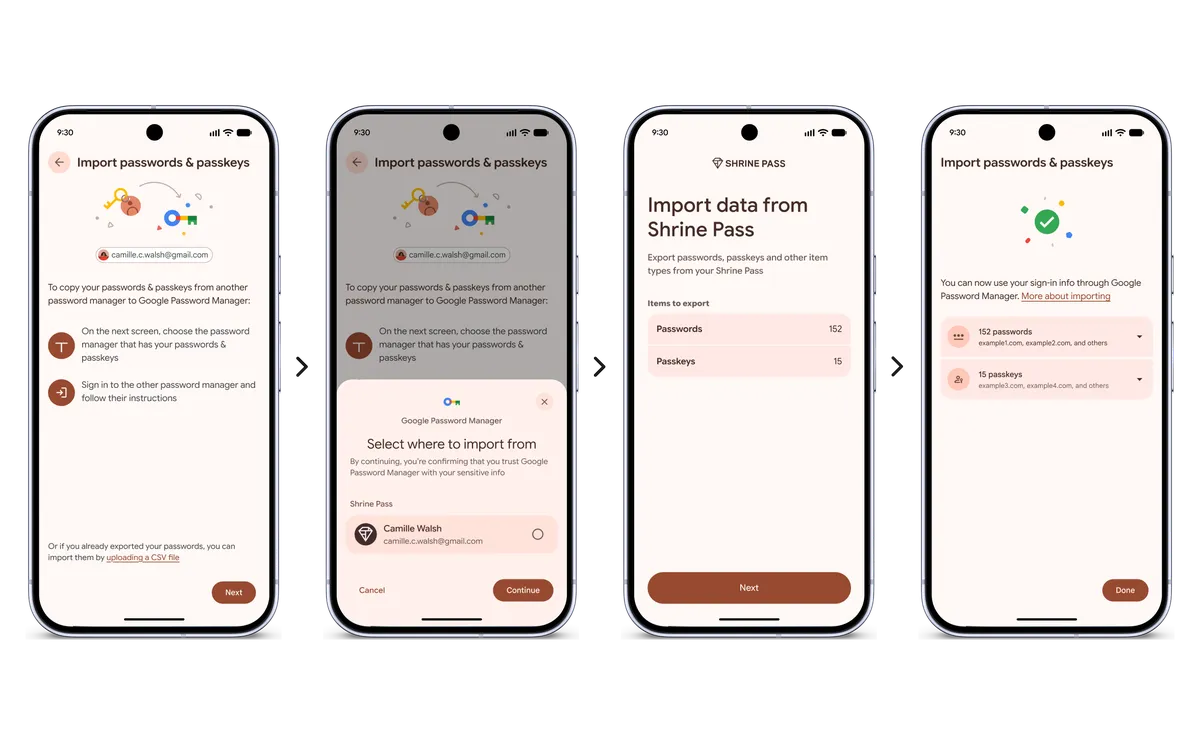
Google is introducing a new experience on Android to help users safely and easily move passwords and passkeys between password managers in just a few clicks—no file downloads required.
Historically, switching password managers meant downloading passwords into an unencrypted text file, leaving them vulnerable on your device. Passkeys couldn't be transferred at all, forcing users to recreate them across multiple sites and apps. The new process simplifies this:
The transfer experience is already available on Google Password Manager, 1Password, Bitwarden Password Manager, and Dashlane, with more partners to follow. The feature is designed to give users complete control over their data and the freedom to switch providers whenever they want.
For a step-by-step walkthrough, users can read more about importing passwords and passkeys in the Help Center.