
Tag: android
A Wi-Fi dead zone is a part of your home where the signal is too weak to use, and the right fix depends on what's causing it and how your home is laid out. Dead zones show up as slow speeds, lag, and dropped calls in one or two rooms while the rest of your home works fine. Your video call freezes in the back bedroom, or a show buffers in the basement. Where your router sits is a common cause, so moving it is often a good, free first step.
Several causes often combine to create dead zones: router placement, distance, thick walls and floors, interference, and an outdated or provider-supplied...
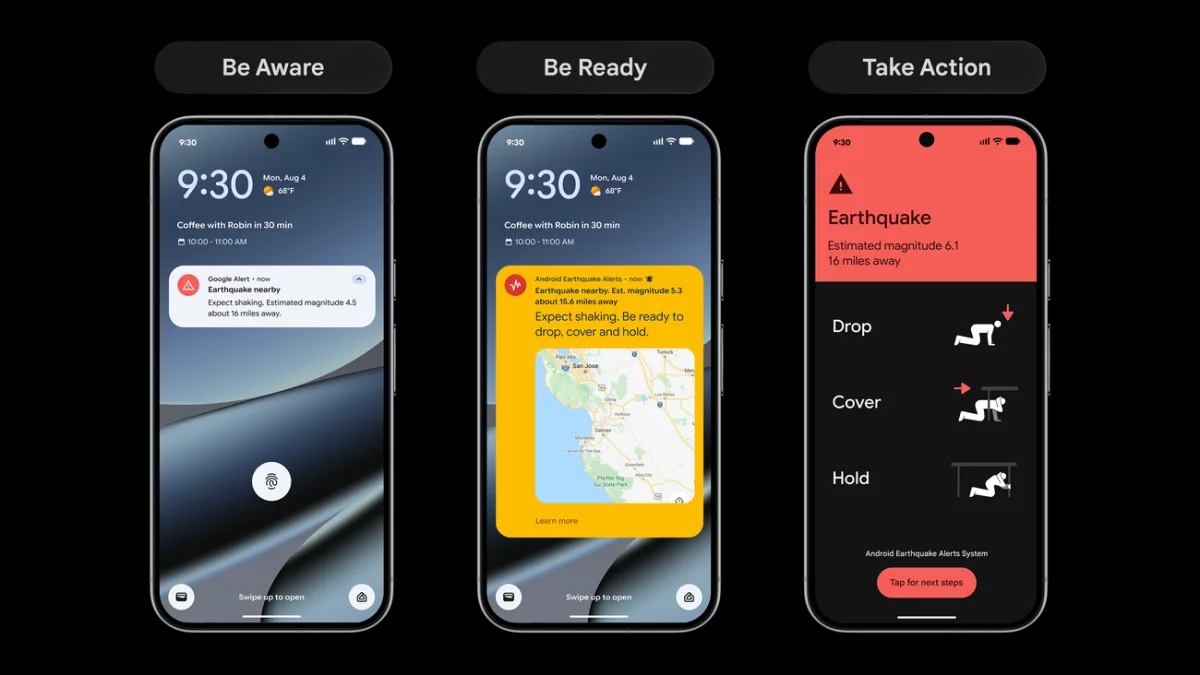
Android earthquake alerts reach more than 200 regions
Android's earthquake warning system now covers more than 200 countries and regions, up from 98. The system, which launched in 2021, has already sent over one billion alerts and is designed to give people a few seconds of warning before shaking starts. Those seconds can be enough to take cover and protect yourself and your loved ones. Panama and Guatemala are among the new locations.
The Android Earthquake Alerts System is, in Google's words, “the world's largest mobile-based earthquake detection network.” Its purpose is to make early warnings possible at scale. Google is also...
Check texts for scams with Circle to Search
Scammers have gotten more sophisticated, but so have the tools we use to stop them. Circle to Search on Android can review suspicious text messages to help you identify potential scams before you click a link or share your personal information.
Checking a suspicious message
A hand tapping a phone screen — Google
To give it a try, long-press the home button or navigation bar on your Android device to activate Circle to Search, then draw a circle around the message you're unsure about. You'll see an AI Overview with guidance and insights, including suggested next steps.
Acting on the...
From Orbit to DNA: Inside Google’s Next Era of Frontier AI
For more than 20 years, Google has invested in machine learning and AI research, tools, and infrastructure to build products that improve everyday life. Teams across the company are working on ways to unlock AI's benefits in fields ranging from healthcare and crisis response to education. Here's a look at some of the company's AI announcements from September.
The big picture
September's headline belongs to Gemini 4 Argon, Google's newest frontier model. Built with advanced reasoning and a 1-million-token context window, it's designed to tackle complex challenges—especially in cybersecurity...
Adobe Premiere mobile app comes to Android
Creators use video storytelling to connect with audiences primarily on mobile devices. Whether inspiration strikes at a concert, during a commute, or at a café, creators need powerful yet intuitive editing tools to bring ideas to life quickly.
Since launching on iPhone last year, Premiere mobile has become a popular choice for creating vlogs, tutorials, podcast clips, and social content. Today, Adobe announced that Premiere mobile is now available on Android, bringing the app to millions more creators worldwide at no cost.
Built around creator feedback, Premiere mobile makes...
Qualcomm and Google Announce Snapdragon X Elite-Powered Googlebook Laptops
Qualcomm Technologies, Inc. and Google have unveiled Googlebook, a new category of premium laptop designed around Google's Gemini Intelligence and powered by the Snapdragon X Elite platform. The devices deliver all-day battery life, powerful performance, and proactive AI capabilities alongside seamless cross-device connectivity with Android phones and tablets.
Googlebook laptops enable native Android applications and games to run on the devices, creating what the companies describe as a connected personal computing ecosystem. Features include Cast my Apps, Magic Pointer, and Rambler—tools...
Switching password managers is easy and safe on Android
Google is introducing a new experience on Android to help users safely and easily move passwords and passkeys between password managers in just a few clicks—no file downloads required.
Transfer passwords and passkeys with ease
Historically, switching password managers meant downloading passwords into an unencrypted text file, leaving them vulnerable on your device. Passkeys couldn't be transferred at all, forcing users to recreate them across multiple sites and apps. The new process simplifies this:
Start the move: Open your new password manager app and select the option to import or copy...