Most gamers reposition their mouse without thinking, but a critical spec controls how your sensor behaves mid-lift. Lift-off distance determines when your optical sensor stops tracking—get it wrong, and your aim drifts during resets. Here's why this invisible setting might change your game.
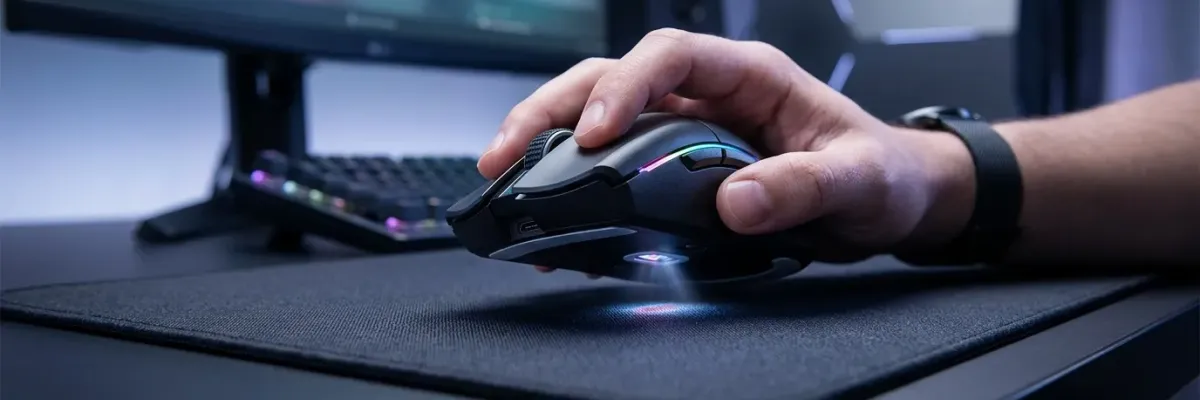
A hand grips a gaming mouse with RGB lighting on a dark mousepad, glowing sensor visible beneath.
Most people don't think much about repositioning their mouse—it becomes second nature. But considerable technology enables seamless repositioning. All optical mice feature a “lift-off distance” (LOD): the height above your mousepad at which the optical sensor stops tracking your movements, preventing the cursor from moving while you reposition.
Designing a gaming mouse would be simpler if one lift-off distance worked for everyone, but variables matter. The ideal setting depends on your mousepad surface, grip style, muscle memory, and preferences for other settings like sensitivity.
What is lift-off distance?
Lift-off distance refers to the height at which a mouse's optical sensor cuts off tracking as the mouse lifts off the pad. While the mouse remains below this distance, the cursor keeps moving. Lift past it, and the sensor stops.
You can observe this with any optical mouse: pick it up slightly above your pad and move it in small circles. Without touching the surface, you'll move the cursor, but at a certain distance from the pad, tracking stops.
Why it matters
Lift-off distance is crucial for enhancing control and precision based on your mousing habits. Gamers reposition their mice more frequently than other PC users, making this setting particularly important for gaming.
The primary concern is preventing cursor movement during repositioning. If your lift-off distance isn't set correctly, your aim might drift during mouse reset. Competitive FPS gamers are especially particular about this setting, particularly regarding flick shots. Low-sensitivity players lift and reposition frequently, but flick shots are almost always followed by an immediate lift-and-reset motion. If the sensor keeps tracking during this reset, your aim can drift.
Low versus high lift-off distance
There's no universal “best” setting—it depends on your mouse, pad, and habits.
A low lift-off distance around 1mm often suits competitive gamers, ensuring the mouse stops tracking the moment you lift it, providing better aim control. Gamers using a claw-style grip or a heavier mouse often benefit from low LOD.
However, reasons exist for a more forgiving 2mm setting. People rarely keep their mouse perfectly flat while gaming, especially during fast flick shots. Additionally, mousepad texture can affect how a sensor interprets lift-off distance. A higher setting can ensure the mouse tracks as intended.
If you built years of muscle memory using a higher lift-off distance, you might prefer a higher setting than most.
Available options
Standard mice typically offer no customization. Mainstream gaming mice usually provide two options: “low” and “high” lift-off distance. For many gamers, these suffice after a couple days of rebuilding muscle memory.
Competitive gamers often benefit from more options. Advanced mice like the ROG Gladius IV Ace and ROG Spatha X 65K offer multiple preset lift-off distances.
Finding your setting
We recommend starting with a low lift-off distance setting for potentially game-changing aim benefits. A setting too high can be annoying—lifting to reset your hand while seeing your crosshair drift is frustrating.
However, lift-off set too low can create “hitches”: moments when you expect tracking but the cursor stays still. Your crosshair might stutter or drop mid-stroke, indicating your lift-off is lower than your grip and pad require.
Start where your old mouse felt natural, then adjust in small steps. If flicks overshooting at the top, step lower. If tracking feels broken on tilts or you use a softer or patterned pad, step higher. Find the point where lifting never costs aim and repositioning never causes drift.
Is upgrading worth it?
Mainstream gaming mice expose two lift-off positions: low and high. This works for many gamers but leaves no middle ground if one feels too tight and the other feels loose.
The main benefit of upgrading to a mouse with more lift-off distance settings is control. Instead of changing your playstyle to accommodate your mouse, you change your mouse to accommodate your playstyle.
The ROG Gladius IV Ace pairs its AimPoint Pro 65K sensor with 11 predefined lift-off distance levels—a real range, not a switch. You can dial in clean flick cut-off for precision aim or maintain tracking through wider strokes. Match lift-off to your surface, setup, and playstyle, and the sensor behaves as your hand expects.
Feature
ROG Gladius IV Ace
Sensor
AimPoint Pro 65K
Lift-off distance levels
11 predefined levels
Frequently asked questions
What is the ideal lift-off distance?
There isn't one. It depends on your pad, grip, and whether you flick or track more. The right level is where the sensor stops when you want it to and stays connected when you don't.
Is a lower lift-off distance always better?
No. Low LOD keeps flicks clean but can cut tracking on tilts and certain pads. High LOD stays connected but can cause drift. The best setting fits your setup.
Why can't I set an exact lift-off distance on my mouse?
Many sensors only expose two positions. A range of levels, like the 11 on the ROG Gladius IV Ace, lets you find the exact spot.
Does my mousepad change lift-off distance?
It changes how a given LOD feels. Softer or patterned surfaces behave differently than hard, uniform ones, which is another reason a range is easier to tune.
How many lift-off levels does the ROG Gladius IV Ace have?
Eleven predefined levels, paired with the AimPoint Pro 65K sensor.